Outlook Calendar Transfer Sync
It is compatible with standard calendar app which comes with your phone.
You may update meeting details (e.g.
meeting place or time) in either side and sync up the other side with this app.
This software package consists of 2 components: one component running on your Android downloaded from Google Play, and one component running on your PC downloaded free from developers web or CNET.
If you have already installed the drivers for your Android device on your PC, installing this software package is a breeze.
Here are the features:1.Support all languages encoded in Unicode.2.Support most Android calendar apps using the standard Android database.3.Preserve more Outlook calendar fields than most other sync software.
E.g.
Attendee details and recurring schedules are preserved.
See details below.4.Android calendar stored in local account named "olcalendar".5.Compatible with Android 4.0 and later versions.
What can you do with it?1.Transfer calendar items between Outlook and Android in the direction you specify.2.Update meetings in either direction.3.Find the number of calendar items existing in Outlook / Android.4.Delete old meetings to clean up your storage.5.Support recurring patterns without exceptions.
Examples of supported: every Tuesday with or without end date; the 3rd Monday of each month; the 4th of July of each year.
Example of unsupported: 3rd Monday of each month except a certain date; the 4th of July of each year except leap years.
Further details
Software Versions supportedWindows versions supported: Windows XP, Windows 7, and Windows 8.Outlook versions supported: Outlook 2003, Outlook 2007, Outlook 2010, and Outlook 2013Android versions supported: Android 4.0 and later versions.
Requirement: Android Debug Bridge (ADB) driver for your device installed on your PC.
Installation1.Download Outlook Calendar Transfer or Outlook Calendar Transfer Trial from Google Play.
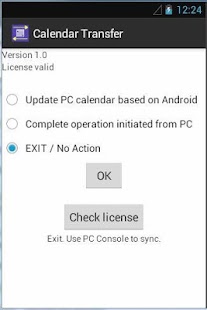
After installation, run the app and click [Check license] to make sure your software license is delivered to your phone.
2.Download Outlook Calendar Transfer Console software from developers web site and install on your PC.
3.Connect your Android to your PC and run the Console software.4.When you run the console for the first time, your anti-virus software may ask you if you allow this app / adb to run.
Give them full access.
You may need to exit and restart the console.
There are device and OS specific instructions for this software.
Please see developer web site (link below) for further details and refund policy.
About Outlook Calendar Transfer Sync
- Package name (App ID)
- com.outlook.calendar
- Available on
- Google Play
- Price
- Free
- Version
- v1.09
- Developer
- Microsoft Corporation
Looking for the Outlook Calendar Transfer Sync APK?
The safest way to get Outlook Calendar Transfer Sync (com.outlook.calendar) on your Android device is to install it directly from Google Play — you'll always get the latest official version, automatic updates, and no risk of modified or infected APK files from third-party sites.
Social Features
Connect and share with friends and the community.
Gaming Features
Enjoy immersive gaming experience with various game modes.
Productivity Tools
Boost your productivity with powerful tools and features.
See Outlook Calendar Transfer Sync in Action

Frequently Asked Questions
Is Outlook Calendar Transfer Sync free?
Yes, Outlook Calendar Transfer Sync is free to download and install on Android through Google Play.
How do I install Outlook Calendar Transfer Sync on Android?
Open Google Play on your Android phone or tablet, search for Outlook Calendar Transfer Sync by Microsoft Corporation or tap the Google Play button on this page, then tap Install. The app downloads and installs automatically.
What is com.outlook.calendar?
com.outlook.calendar is the App ID (package name) of Outlook Calendar Transfer Sync on Google Play. Every Android app has a unique package name, and it is the safest way to verify you are installing the official app.
Is Outlook Calendar Transfer Sync safe to download?
Installing Outlook Calendar Transfer Sync from Google Play is the safest option: you get the official version published by Microsoft Corporation, verified by Google Play Protect, with automatic updates. Avoid APK files from unofficial third-party sites.
Get Outlook Calendar Transfer Sync Today
Outlook Calendar Transfer Sync for Android — free download on Google Play.
Compatible with Android phones and tablets — available on Google Play.
Ask AI about this app
Get instant answers about features, tips and more from popular AI assistants.